
Quanser Qube-Servo 3-USB
The Quanser Qube-Servo 3-USB is an integrated DC-servo motor experiment. It is designed to help teach fundamental control concepts and theories on an easy-to-use and intuitive platform. For more information, visit Quanser Qube-Servo3
The RCP Toolkit driver name for this card is qube_servo3_usb.
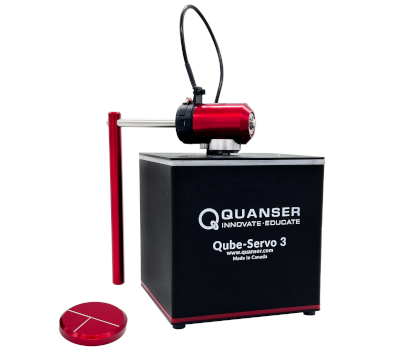
The Quanser Qube-Servo 3-USB I/O channels are described below.
Clocks
There are currently no configuration options for the Quanser Qube-Servo 3-USB clocks.
Analog Inputs
The Quanser Qube-Servo 3-USB supports one analog input, which is channel zero. The analog input measures the current to the motor in Amperes. Its maximum range is ±3A.
Analog Outputs
The Quanser Qube-Servo 3-USB supports one analog output, which is channel zero. The analog output drives the motor voltage. Its maximum range is ±15V. The pwm_en board specific option must not be set in order to use analog output on this card.
In order to have analog outputs set to a particular voltage when the block diagram is run or stopped, the analog outputs must be configured on the HIL Initialize VI's Analog Outputs tab.
Once the analog output ranges have been configured, set the Initial analog outputs and Final analog outputs to the desired voltages.
Digital Inputs
The Quanser Qube-Servo 3-USB supports three digital inputs, which are used for diagnostics. The digital inputs are enumerated in the table below.
|
Channel |
Description |
|---|---|
|
0 |
Amplifier fault. If the amplifer is enabled and this fault occurs, the amplifier may be experiencing excessive temperatures and shut down to protect itself. |
|
1 |
Motor stall detected. Occurs when the motor is stalled or excessively slowed and the applied voltage (including deadband compensation) is greater than 5V. |
|
2 |
Motor stall error. When a stall warning has been asserted continuously for approximately 3s. |
Digital Outputs
The Quanser Qube-Servo 3-USB supports one digital output, which is channel zero. The digital output acts as an enable for the motor drive circuitry. When this output is low, the motor amplifier is disabled. When it is high, the motor amplifier is enabled.
The Quanser Qube-Servo 3-USB has internal stall detection and once a stall error is asserted, the amplifier is automatically disables itself. The card can be re-enabled by setting the output low then high again.
| Note: Constantly resetting the amplifier whenever a stall-error occurs can result in excessive heat being generated by the motor potentially causing damage. |
Encoder Inputs
The Quanser Qube-Servo 3-USB supports two encoder inputs. Both channels provide 24-bit count values. These two channels only support 4X quadrature mode. The encoder channels are enumerated in the table below:
|
Channel |
Description |
|---|---|
|
0 |
Motor position |
|
1 |
Encoder 1 position (typically used for the inverted pendulum) |
In order to set the encoder counters to a particular count when the model is loaded, the encoder inputs must be configured on the HIL Initialize VI's Encoder Inputs tab.
The encoder inputs are sampled simultaneously when measured using a single HIL Read VI.
PWM Outputs
The Quanser Qube-Servo 3-USB driver supports one PWM output channel, which is channel 0. Its maximum range is ±1 mapping to ±24V. Note, however, that the Quanser Qube-Servo 3-USB internally limits the output voltage to 15V or a corresponding PWM value of 0.625. The pwm_en board specific option must be set in order to use PWM output on this card.
The PWM mode, frequency or configurations are fixed and cannot be modified.
| Note that deadband compensation is not used in the PWM mode. |
Other Inputs
The Quanser Qube-Servo 3-USB supports two other input channels, which are 32-bit digital tachometer readings based on a 72MHz counter. The other input channels are enumberated in the table below:
|
Channel |
Description |
|---|---|
|
14000 |
Motor velocity |
|
14001 |
Encoder 1 velocity (typically used for the inverted pendulum) |
The units are counts/s.
Other Outputs
The Quanser Qube-Servo 3-USB supports three other output channels, allowing the color of the LED panel to be controlled. Note that each channel supports fractional values between 0 and 1, allowing full RGB color. Refer to the table below for a list of the channels:
|
Channel |
Description |
Range |
|---|---|---|
|
11000 |
Red component for LED color |
0 to 1 |
|
11001 |
Green component for LED color |
0 to 1 |
|
11002 |
Blue component for LED color |
0 to 1 |
Interrupts
The Quanser Qube-Servo 3-USB card, or its driver, does not support any interrupt sources.
Watchdog
The Quanser Qube-Servo 3-USB supports a watchdog timer for resetting the outputs on watchdog expiry. Namely, the analog, digital and other output channels will be reset to the user-defined values on watchdog expiry. Resetting of the outputs occurs without software intervention, and therefore may be used as a safety mechanism in the event of software failure.
To enable the resetting of the analog or digital, check the Set output on watchdog options on the respective tabs of the HIL Initialize VI parameters dialog. Set the Output on watchdog expiry fields to the desired values. Then place a CL HIL Watchdog VI in the diagram.
Once the watchdog has expired, further output is disabled until the watchdog state is cleared. Hence, in RCP, the outputs will remain in the watchdog state even after the VI is stopped, unless a CL HIL Watchdog Clear VI is used to clear the watchdog state. Restarting the VI will automatically clear the watchdog.
Board-Specific Options
The Quanser Qube-Servo 3-USB has a number of board-specific options to control specialized functionality of the card.
pwm_en
Set this option to "yes", "y", or "1" to enable control of the motor using PWM command.
| When this option is set, the analog output cannot be used. All references to setting initial and final outputs must be removed. In Simulink, in the HIL Initialize block on the Analog Outputs tab, change the Analog Output Channels from [0] to []. On the PWM Outputs tab change the PWM Output Channels from [] to [0]. Also note that deadband compensation is disabled and any user-specified value in the board-specific options will be ignored. |
deadband_compensation
This option offsets the motor command by the specified voltage to compensate for amplifier deadband. The default
value is deadband_compensation=0.65. This option is only available for analog outputs and will be ignored if the pwm_en
option is used.
enc0_velocity
Set this option to the minimum velocity in counts per second that should be detected by the motor digital tachometer. This limit
is an artificial limit that is useful when friction stops the device long before it reaches the slowest detectable velocity of
the Quanser Qube-Servo 3-USB hardware. If this option is set to zero then the slowest velocity measurable by the hardware is used. The default
value is enc0_velocity=0.0 which disables the clamping function.
enc1_velocity
Set this option to the minimum velocity in counts per second that should be detected by the pendulum digital tachometer. This limit
is an artificial limit that is useful when friction stops the device long before it reaches the slowest detectable velocity of
the Quanser Qube-Servo 3-USB hardware. If this option is set to zero then the slowest velocity measurable by the hardware is used. The default
value is enc1_velocity=0.0 which disables the clamping function.
Properties
The Quanser Qube-Servo 3-USB driver currently supports the following read-only properties:
|
Property |
Type |
Description |
|---|---|---|
|
PROPERTY_INTEGER_VENDOR_ID |
Integer |
Vendor identifier associated with the hardware |
|
PROPERTY_INTEGER_PRODUCT_ID |
Integer |
Product identifier associated with the hardware |
|
PROPERTY_INTEGER_FIRMWARE_MAJOR_VERSION |
Integer |
Major version number of the firmware (hardware) |
|
PROPERTY_INTEGER_FIRMWARE_MINOR_VERSION |
Integer |
Minor version number of the firmware (Qube interface) |
|
PROPERTY_INTEGER_FIRMWARE_BUILD |
Integer |
Build number of the firmware (currently always zero) |
|
PROPERTY_INTEGER_FIRMWARE_REVISION |
Integer |
Revision number of the firmware (currently always zero) |
|
PROPERTY_STRING_MANUFACTURER |
String |
Manufacturer of the device |
|
PROPERTY_STRING_PRODUCT_NAME |
String |
Product name of the device |
|
PROPERTY_STRING_MODEL_NAME |
String |
Model name of the device |
|
PROPERTY_STRING_SERIAL_NUMBER |
String |
Serial number of the device |
|
PROPERTY_STRING_FIRMWARE_VERSION |
String |
Firmware version of the PC interface |
Targets
|
Target |
Supported |
Comments |
|---|---|---|
|
Yes |
Fully supported. |
See Also
Copyright © Quanser Inc. This page was generated 2024-11-15. Submit feedback to Quanser about this page.
Link to this page.
