
Quanser Mechatronics Sensors Trainer USB Colour RGB / Clear Page
The Quanser Mechatronics Sensors Trainer USB Colour RGB / Clear Page plots the RGB and clear colour components measured by the VEML3328 colour sensor. It plots the red, green, blue and clear components of the colour as fractions between zero and one. The page is displayed below with a sample plot, showing the red colour component in red, the green colour component in green, the blue colour component in blue and the clear colour component in cyan. It also shows the combined colour in a vertical bar on the right hand side of the plot.
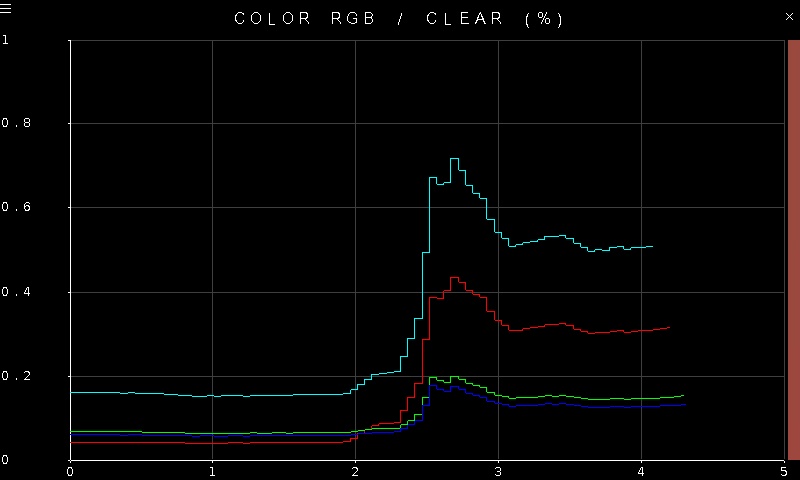
To go back to the Sensors page, tap on the close button in the top, right corner of the page. To change the sensor parameters, tap on the hamburger menu in the top, left corner of the page. This will open the settings screen described in the section below.
The readings from the sensor have 16 bit resolution. The plot axes are fixed. Note that colour sensing does better in bright illumination. Hence, the settings page allows the illumination to be controlled via LEDs surrounding the sensor.
Settings
The settings page is illustrated below. Note that this settings page is shared with the colour infrared sensor.
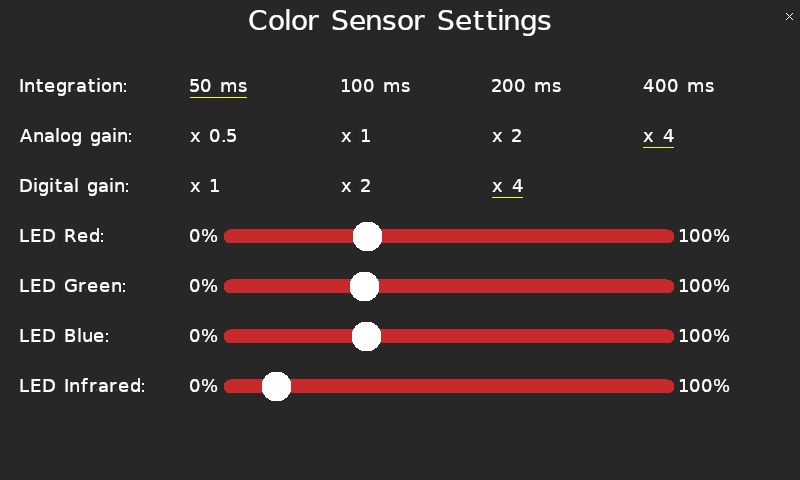
The Integration parameter allows the integration time of the sensor to be configured. A larger integration time may improve the sensitivity of the measurement but increases the lag. Changing this value will affect the colour infrared sensor as well.
The Analog gain allows the amplification of the analog colour signal to be configured, up to 4X amplification. The sensor also supports a Digital gain of up to 4X amplification. Changing these values will affect the colour infrared sensor as well.
The sliders allow the illumination surrounding the colour sensor to be controlled. There is a red LED, green LED and blue LED whose intensity may be controlled using the LED Red, LED Green and LED Blue sliders respectively. Set a slider to 0% to turn off the LED. Set it to 100% to get the maximum illumination. Illumination is recommended when measuring colour.
Tap the close button in the top, right of the page to apply the new settings and return to the plot.
Copyright ©2026 Quanser Inc. This page was generated 2026-05-13. Submit feedback to Quanser about this page.
Link to this page.